KnitBuddy knitting app with row counter and calculators
ReleasedProjects, patterns, yarn and needles in one place.
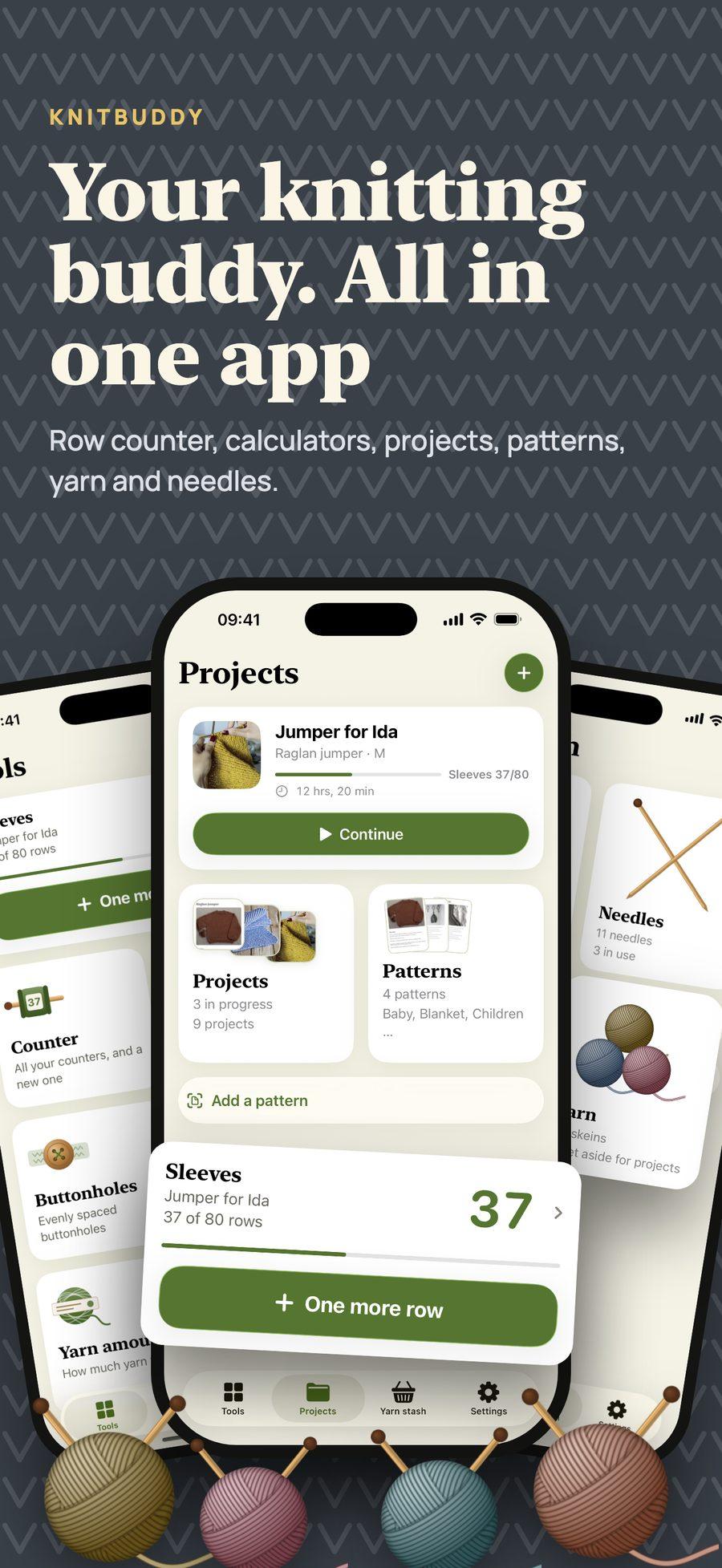
KnitBuddy is your knitting buddy. Your projects, knitting patterns, yarn and needles are in one place, so you can always see what is on your needles, where you are, and what you have at home. That leaves your mind free for the knitting, and for enjoying it. The same maths is on this site as knitting calculators you can use in the browser.
- Platforms
- iPhone · iPad · Apple Watch · Android
- Category
- Lifestyle
- Version
- 1.9.6
- Released
- 3 October 2026

Knitting calculators, free in your browser
The same maths as in KnitBuddy: even increases and decreases, sleeves, buttonholes, gauge and yarn amount. Work it out here, and keep it in the app while you knit.
- Decrease or increase evenlyDecrease evenly across a row – or increase – flat or in the roundCalculate
- Buttonhole spacingButtonhole spacing along a knitted front band, even from end to endCalculate
- Gauge converterConvert a pattern's stitches and rows to your knitting gaugeCalculate
- Sleeve increases over rowsHow often to increase up a sleeve, or decrease down a bodyCalculate
- Yarn amountHow many skeins of your yarn a knitting pattern needsCalculate
- Knitting calculators
A closer look
Tap any screenshot to open it full screen.
What the app does
Everything the KnitBuddy app does, without the filler.
Your projects in one place
Each piece of knitting gets its own project with pattern, counters, yarn, needles, notes and photos, so everything belongs together. Tap Continue, and the pattern opens on the page where you left off, with the counter ready at the bottom. All a project needs to get started is a name.
Your knitting patterns at hand
Keep all your patterns in one place, so you do not have to search through emails, folders and piles of paper. Add a PDF from Files or Mail, take photos of a printed pattern, or scan the pages so the edges are found and the page is straightened. Sort your patterns into categories, and find them again with search.
An overview of yarn and needles
See at a glance what you have at home before you buy more or cast on. Take a photo of the ball band, and the brand, grams, metres and needle size are filled in for you. Your needles are in the stash, and you can see which are in use and which a project is still missing. Yarn you have entered before is suggested, and a finished project takes its yarn out of the stash by itself.
The counter that keeps track
Give the body, the sleeves and the repeats a counter each with a goal, and feel a small buzz when you reach it. Count on iPhone and iPad at the same time, and both count. The screen stays on while you knit.
Count without touching your phone
Your counter sits on the Lock Screen, in the Dynamic Island and in a widget on the Home Screen, with a + for one more row. The Action button, Control Centre and Siri (“One more row in KnitBuddy”) count too, and so does the Action button on Apple Watch Ultra.
Apple Watch: count rows on your wrist
A big “One more row” button, a small minus to undo, and a double tap with your fingers counts a row when your hands are full of knitting. Turn the Digital Crown to switch counters. On the watch face and in the Smart Stack, see how far you are, one tap from the counter. Your count stays in step on iPhone, iPad and Apple Watch: the watch counts on its own and sends its rows when your iPhone is near.
A row marker in your pattern
A band in your yarn colour lies over the line you are knitting. Drag it along, or let it move down a line each time you count. Pin notes to the page where you need them.
Pattern and counter side by side on iPad
On a wide iPad the count, the reminders, your counters and notes sit beside the page.
Count with the whole screen
A tap anywhere is one more row, and the row's reminder sits at the top.
The maths done for you
Even increases and decreases, in the round and back and forth. Buttonholes evenly spaced along the band. The pattern converted to your own tension. Tension squares written down and compared with the pattern. Tick off each line as you knit, and save the calculation in the project.
Increase up a sleeve, decrease down a body
A tool spreads the stitches evenly over the rows, for example every 9th row 8 times, then every 8th row 4 times, and makes a counter that reminds you when to increase or decrease. The increase/decrease calculator also takes many stitches over a few rows, such as from 100 to 50 stitches over 7 rows. Repeats and reminders on a counter: “every 8th row, 10 times”, and “Row 24: change to colour B”. Increase/Decrease is one tool with two cards: evenly across the row, or up a sleeve with rows between.
Enough yarn?
A calculator tells you how many skeins to buy and checks what you already have in your stash. It also suggests yarn from your stash that is about as thick as the pattern's.
Even, right to the edges
Type the stitches and how many to increase or decrease. Knitting flat, the row starts and ends with the same number of stitches, so the shaping is spread across the whole piece; in the round, it is spread evenly all the way round.
Buttonholes
Enter the stitches in the band, the number of buttonholes and how many stitches each takes, and get the spacing – with the same number of stitches at both ends, chosen for you or set by you.
Your own gauge
Convert a pattern's stitches and rows to your own gauge, and see how many stitches and rows you need for a measurement in centimetres.
See how long each project takes
The time is counted while you count rows, also from Apple Watch and the Lock Screen. A break of more than 10 minutes ends a session, and you can add time you knitted without the counter. Statistics on projects, yarn and needles: projects added and finished, where the time and the yarn went, how much yarn you have used this month, this year and in all, and which needles are in use and used most.
Your knitting stays yours
Share photos or a web page to KnitBuddy to keep it as a pattern, import your yarn and needles from a spreadsheet, and find projects, patterns and yarn in Spotlight. Export a project as a PDF, or everything at once. Export everything includes a backup, and “Read a backup back” under Your data adds only what is missing. Nothing is overwritten. The iCloud page shows when it last synced, or what is stopping it. If your trial or subscription ends, you can still see and export everything you have made.
A buddy you can trust
No account, no ads, and it works offline. Your projects are kept in your own iCloud, which we cannot see, and nothing is sent to us. KnitBuddy comes in 35 languages with each language's own knitting abbreviations, in a light or dark design, in ten yarn colours, and works with large text and VoiceOver.
Get KnitBuddy
Projects, patterns, yarn and needles in one place.
Why people use KnitBuddy
The reasons that survive the second week.
No pencil and paper
The instructions appear while you type, in the knitting abbreviations of your own language.
Your data stays yours
No account, no ads, works offline. Everything is calculated on your phone, and your projects are kept on your device and in your own iCloud, which we cannot see. Nothing is sent anywhere else.
Made for knitting hands
Big buttons, a screen that stays on while you knit or count, and two columns on iPad.
KnitBuddy at a glance
KnitBuddy is a knitting app for iPhone, iPad, Apple Watch and Android from the Danish studio EU Studio. It keeps your projects, patterns, yarn and needles in one place, counts your rows and works out increases, decreases and buttonholes for you.
Read the full description
KnitBuddy is your knitting buddy. Your projects, knitting patterns, yarn and needles are in one place, so you can always see what is on your needles, where you are, and what you have at home. That leaves your mind free for the knitting, and for enjoying it.
KnitBuddy does the maths you would otherwise do with pencil and paper.
For example, enter how many stitches are on your needle and how many to decrease or increase. KnitBuddy works out how to do it evenly – and you can tick off how far you have got.
- Developer
- EU Studio, Denmark
- Category
- Lifestyle
- Platforms
- iPhone, iPad, Apple Watch, Android
- Price
- Free, with in-app purchases
- Languages
- English, Danish, German, French, Spanish, Italian and 25 more
- Status
- Released · 3 October 2026 · Version 1.9.6
- Knitting calculators
- Free knitting calculators
Frequently asked questions
Look around the whole app with an example before you decide. When you are ready, choose a yearly subscription with a free trial for new subscribers, or unlock the app for good with a single purchase. The subscription renews automatically every year until you cancel it, and you can cancel it at any time in your App Store settings.
What's next
Planned work, in no guaranteed order and with no promised dates.
- Shipped
App Store release
Version 1.0 for iPhone and iPad is on the App Store, released 3 October 2026.
- Shipped
Android on Google Play
StrikkeMakker for Android is on Google Play in the same 35 languages. Version 1.5 (October 2026) brought projects, patterns and the yarn stash to Android, alongside the calculators and the row counter.
- Shipped
Version 1.2
Projects, patterns, several counters, the yarn stash and iCloud sync between your own devices. Released 10 October 2026.
- Shipped
Version 1.3
A new menu with four tabs: Tools, Projects, Yarn stash and Settings. Needles in the stash, and yarn suggested from what you have written before. Released 11 October 2026.
- Shipped
Version 1.4
Apple Watch: count rows on your wrist, see how far you are on the watch face and in the Smart Stack, and keep the count in step on iPhone, iPad and Apple Watch. Released 16 October 2026.
- Shipped
Version 1.5
Count from the Lock Screen and a widget, follow your row with a marker in the pattern, and let the counter remind you when to increase. Released 17 October 2026.
- Shipped
Version 1.6
Count by voice, draw on the pattern, switch between a project's counters in the pattern, and get leftover yarn back in the stash. Released 22 October 2026.
- Shipped
Version 1.7
Pattern and counter side by side on iPad, count with the whole screen, Increase/Decrease as one tool, and a backup you can read back. Released 24 October 2026.
Version history
Version 1.9.6
- The app interrupts you less: the question about a rating now waits until you are done with what you are doing.
Version 1.9.5
- Knitting time follows the counter: when you move a counter on from one project to another, the time it counted goes to the new project. Before, the time stayed on the first project.
- The link when sharing: “Include a link to KnitBuddy” is now in Settings too, so you can turn it off for a shared calculation as well.
- Share pattern: the sheet opens faster, and if the PDF cannot be made, you are told.
- The guide “Count without opening the app” now names the widget and the shortcut as your phone shows them.
Version 1.9.4
- Share a pattern with anyone: “Share pattern …” on a project or a pattern makes a PDF you can send to anyone, with or without your drawings, and with your notes and calculations if you like. The PDF has no logo or link from us. You choose whether the message links to KnitBuddy.
- Move a counter to a project: “Move to project …” in the counter’s ⋯ menu, also to a new project. The count, goal, repeats and reminders come along, and a counter you started on its own brings its knitting time.
- Count without opening the app: the tip on the counter now has “Show me how”, with a card for each way your device has (the Lock Screen, widgets, the Action button, Siri and Apple Watch) and how to set it up. It is also in Settings, under Counter on the Lock Screen.
- When CrochetBuddy is on the same device, its card in Settings now opens it and shows whether the two apps share your yarn stash.
Version 1.9.3
- Photos of your needles: add photos to needles in the stash, for example of the pack they came in, and you know the maker, the line and the size again. The first photo shows in the list.
- Needles you remove from the stash now wait in Recently deleted for 30 days, with their photos, and come back to their projects when you restore them.
- One yarn stash for KnitBuddy and CrochetBuddy: the switch in Settings › iCloud now names both apps. If CrochetBuddy is not on your phone, the app says so and shows where to get it. Before your yarn is shared the first time, the app keeps a backup of your library on the phone, under Settings › Your data.
- Fixed: after you changed the language in the app, the card about CrochetBuddy could fade between the two languages.
Version 1.9.2
- Yarn from your stash for a pattern: add the pattern’s tension and yarn amount on its page, and see which of your yarns fit or come close, and whether you have enough for each size. The app can also find the tension in the pattern itself, and “Start project with this yarn” sets the skeins aside.
- One yarn stash for both apps: if you also use CrochetBuddy, turn it on in Settings › iCloud in each app. Your yarn is then the same in both, and a change in one reaches the other. It is off until you turn it on, and only yarn is shared, not projects or needles. Yarns that look the same can be combined or kept apart.
- Buddy price: once you have paid for CrochetBuddy, KnitBuddy’s one-time purchase is at least 40% cheaper for you, and the other way round. No code: the discount follows your Apple Account.
- When two devices take the same yarn from the stash before iCloud has synced, both now count. Before, one of them could be lost.
- Spreadsheet import reads US, UK and Japanese needle sizes, lengths in inches and the Arabic decimal mark, and keeps a needle range such as 3-4 in the notes.
- With large text, the price and buttons on the purchase screen now come right after the headline.
- Fixed: rows counted on another device are no longer lost when you read a backup back, and an erased stroke stays erased. The Lock Screen counter shows a lock instead of disappearing when the app is locked, and patterns exported with your drawings no longer have shifted pages.
Version 1.9.1
- With “Keep the screen on” turned on, the screen now stays on while you count, also in a project’s counter and in the pattern.
- “One more row” on the Lock Screen counts without unlocking the phone, and so do Siri, Control Centre and the Action button, always on the counter for what you are knitting. The Lock Screen counter also keeps going after 8 hours.
- Each row counts exactly once on iPhone, iPad and Apple Watch: Undo and Start again agree on every device, also after one has been offline.
- The pattern stays on your page, place and zoom, and a row marker that follows the counter moves wherever you count.
- Reading a backup back on a new device waits for iCloud, so nothing is added twice. It now also brings back pages deleted from a pattern and every calculator’s ticked lines.
- When a trial ends or a subscription year renews, the app no longer asks you to buy in the meantime.
- Buy the one-time purchase during your free trial, and the app now reminds you to cancel the trial, so you are not charged for both. If a year was charged anyway, you can ask Apple for a refund from Settings.
- Spreadsheet import keeps every row and reads units and amounts as the sheet writes them.
Version 1.9
- Several repeats on one counter: follow a stitch pattern over 6 rows and increases every 4th row at the same time. One tap counts them all, and each repeat shows where you are in it, under its own name.
- On iPhone, repeats and reminders are one tap away, right under the counter.
- Knit again keeps your counters' repeats and reminders.
Version 1.8
- Categories on projects: sort your projects into socks, cardigans and the rest, with the same categories as your patterns. Tap one above your projects to see them all, planned, in progress and finished.
- Name your needles: write the maker, the line or your own name, such as ChiaoGoo or Addi Lace, and find them by name under Needles in the yarn stash.
- Half and quarter skeins are shown as you wrote them, also in totals and statistics: 2.5 skeins no longer becomes 3.
- Ball band: the needle size is also read by the needle drawing, as 3-4 or with a half such as 3½, the tension from its square, and the maker from “Imported by”. A crochet hook’s size is no longer taken for the needle.
- Missing something? Read another side of the band, and what it finds is added to what was already read.
Version 1.7.5
- Black Friday: until 30 November, the one-time purchase costs less. It unlocks everything, as always. You’ll find the offer on the purchase screen and in Settings.
Version 1.7.4
- Ready for iPhone Duo: unfolded, the app fills the large screen, with the counter beside the pattern and the cards on the first pages across the full width.
Version 1.7.3
- If you own the one-time purchase and your subscription still renews, Manage Subscription now stays in Settings, so you can cancel it.
- The full purchase is now called a one-time purchase. Nothing changes if you already own it.
Version 1.7.2
- The pattern reader remembers how far you zoomed and where you were, for each project.
- Tap the row marker twice to zoom in on the line you are knitting. Tap twice again for the whole page.
- New tips show how the row marker follows your counter, also when you open a pattern without a project.
Version 1.7.1
- Drawing on the pattern no longer freezes the app, and erased strokes stay erased. The drawing bar has its own Eraser and Undo, and ink stays on its page.
- Hold the row marker to hide it, right where it lies.
- Change things after saving: rename a project from its menu, edit a journal note, rename a saved calculation, and correct a knitting session’s length.
- If iOS has turned Live Activities off for the app, Settings now says so under Counter on the Lock Screen, with a way to turn them back on.
Version 1.7
- iPad: pattern and counter side by side. On a wide iPad the count, the reminders, your counters and notes sit beside the page.
- Count with the whole screen: a tap anywhere is one more row, and the row’s reminder sits at the top.
- Increase/Decrease is one tool with two cards: evenly across the row, or up a sleeve with rows between.
- A backup you can read back: Export everything now includes one, and “Read a backup back” under Your data adds only what is missing. Nothing is overwritten.
- Opening a saved calculation keeps your own numbers: “Back to your numbers” brings them back.
- Changing a yarn’s unit asks for the ball band’s numbers instead of turning 5 balls into 5 g.
- Your page in the pattern is kept, also when pages are moved or a file is missing on one device. Drawings made on two devices at once are both kept.
- Purchases hold when the App Store cannot be reached, and Restore Purchases says so.
- Tips, one at a time and only where they help. Grey text is easier to read, also with large text.
Version 1.6
- Count by voice: tap the microphone in the pattern and say “next” or “one more row” when your hands are full. Only your phone hears what you say, and it never leaves it. (Requires iOS 26.)
- Draw on the pattern: circle your size or mark a line with your finger or Apple Pencil. Drawings belong to the project, so the same pattern can be knitted again in another size, and they come along when you share the project.
- All the project’s counters sit as tiles above the counter bar in the pattern. One tap switches counter.
- Leftover yarn comes back: when a project is finished, the app asks how much you used and puts the rest back in the yarn stash. If you correct it later, the stash follows.
- Gauge on yarn: “22 sts × 30 rows” is read from the ball band and shown in the yarn stash and next to suggestions for other yarn.
- An increase or decrease, or buttonholes, saved in a project now opens in the project, so you can tick off the lines with the counter below.
- The yarn stash’s numbers are easier to read with large text.
Version 1.5.1
- Your progress is kept. Ticked-off lines in Increase/Decrease and Buttonholes stay ticked when the app is closed. They go with a calculation saved in a project, also to your iPad.
- Recently deleted: bring back a deleted project, pattern or yarn for 30 days, under Settings.
- Notes and numbers are saved as you type, and the app asks before it deletes or resets anything.
- Undo start again stays in the counter's menu and keeps the rows counted since. Rows counted on another device before it heard you started again are kept too.
- The pattern reader uses the whole screen, and the counter's reminder sits in the counter bar.
Version 1.5
- Count without touching your phone. Your counter sits on the Lock Screen, in the Dynamic Island and in a widget on the Home Screen, with a + for one more row. The Action button, Control Centre and Siri (“One more row in KnitBuddy”) count too, and so does the Action button on Apple Watch Ultra.
- A row marker in your pattern: a band in your yarn colour lies over the line you are knitting. Drag it along, or let it move down a line each time you count. Pin notes to the page where you need them.
- Repeats and reminders on a counter: “every 8th row, 10 times”, and “Row 24: change to colour B”.
- Increase up a sleeve, decrease down a body: a new tool spreads the stitches evenly over the rows, for example every 9th row 8 times, then every 8th row 4 times, and makes a counter that reminds you when to increase or decrease. The increase/decrease calculator now also takes many stitches over a few rows, such as from 100 to 50 stitches over 7 rows.
- Enough yarn? A new calculator tells you how many skeins to buy and checks what you already have in your stash. It also suggests yarn from your stash that is about as thick as the pattern's.
- See how long each project takes: the time is counted while you count rows, also from Apple Watch and the Lock Screen. A break of more than 10 minutes ends a session, and you can add time you knitted without the counter.
- Statistics on projects, yarn and needles: projects added and finished, where the time and the yarn went, how much yarn you have used this month, this year and in all, and which needles are in use and used most.
- Bring your knitting along: share photos or a web page to KnitBuddy to keep it as a pattern, import your yarn and needles from a spreadsheet, and find projects, patterns and yarn in Spotlight.
- Your knitting stays yours: export a project as a PDF, or everything at once. The iCloud page shows when it last synced, or what is stopping it. If your trial or subscription ends, you can still see and export everything you have made.
- On Apple Watch, a tip shows how to keep the counter in front instead of going back to the clock face.
Version 1.4
- Apple Watch: count rows on your wrist. A big “One more row” button, a small minus to undo, and a double tap with your fingers counts a row when your hands are full of knitting. Turn the Digital Crown to switch counters.
- On the watch face and in the Smart Stack: see how far you are, one tap from the counter.
- Your count stays in step on iPhone, iPad and Apple Watch. The watch counts on its own and sends its rows when your iPhone is near.
- A clearer buzz when you reach your goal.
- Calmer tiles with new drawings on the Tools tab, and the counter's name stands clear of the count in the pattern.
Version 1.3.2
- “Look around first” now shows an example that looks like a real knitter’s: photos of every yarn with colour number and dye lot, the needles in the stash, socks on the needles and a project journal with photos. The App Store page also has a short video of the app.
Version 1.3.1
- New App Store pictures that show the whole app. The app itself is the same as 1.3.
Version 1.3
- A new menu with four tabs: Tools, Projects, Yarn stash and Settings. Tools opens with the counter you used last at the top.
- Needles in the stash: keep your needles in the app, choose a project's needles from there, and see which are in use and which a project still needs.
- Less typing: brand, yarn name and fibre suggest what you have written before. Choosing a yarn fills in only the empty fields.
- Read the ball band on a project's yarn too. Put the yarn in the stash, and the photo, grams and metres go with it.
- Everything stays in your own iCloud. Nothing is sent to us.
Version 1.2
- Projects: the pattern, counters, notes, photos, yarn and needles together. Continue takes you back to the right page with the counter.
- Patterns: add a PDF, photos or a scan of a printed pattern. The page is found and straightened, and you can sort your patterns into categories.
- Several counters per project. Count on iPhone and iPad at once, and both count.
- Yarn stash: scan a ball band and the brand, grams, metres and needle size are filled in. A finished project takes its yarn out of the stash.
- Tension square: write down the needle you tried and what it gave, and compare it with the pattern.
- Save a calculation to a project, and choose the app's colour in Settings.
- Everything stays in your own iCloud. Nothing is sent to us.
Version 1.0.3
- KnitBuddy now has a name of its own in each of its 35 languages, such as StrickKumpel in German and Tricopain in French. In English it is still KnitBuddy.
Version 1.0.2
- You can now choose the app's language in Settings. The Done button above the number pad now appears on every tab.
Version 1.0.1
- Small improvements and fixes.
Version 1.0
- First release on the App Store.
You may also like
Other apps built with the same care as KnitBuddy.
- Released
- Beta
- Released
- Released

Get KnitBuddy
Projects, patterns, yarn and needles in one place.